
Converting lights
Every Octane light gets a new Redshift light directly below it in the Object Manager, with
the same position, rotation and parent. It’s named RS <original name>. The original stays
where it is unless you tick Delete Octane Lights.
Octane lights in Cinema 4D are ordinary Cinema 4D lights carrying an Octane light tag, plus objects (usually a Sky) carrying an Octane Daylight or Environment tag. The converter handles all three.
Which light becomes which
Section titled “Which light becomes which”For a Cinema 4D light with an Octane light tag, the Type of the Cinema 4D light decides the Redshift light:
| Cinema 4D light type | Redshift light |
|---|---|
| Area | Area |
| Omni | Point |
| Spot | Spot |
| Square Spot | Spot |
| Infinite | Infinite |
| Photometric | IES |
| Any other type | Area |
| Octane tag | Redshift light |
|---|---|
| Daylight (on a light or any other object) | Physical Sun |
| Environment (HDRI) | Dome |
What carries across
Section titled “What carries across”| Area, Point, Spot, Infinite | Physical Sun | Dome | |
|---|---|---|---|
| Position, rotation, parent | ✓ | ✓ | ✓ |
| Position, rotation and visibility animation | ✓ | ✓ | ✓ |
| Visible in editor / renderer, enabled | ✓ | ✓ | ✓ |
| Other tags (Target, Constraint, Align to Spline…) | ✓ | ✓ | ✓ |
| Size X / Y and its animation | Area and Spot | — | — |
| Power → Intensity, and its animation | ✓ (× 0.1) | — | ✓ (× 10) |
| Colour temperature, and its animation | ✓ | — | — |
| HDRI image | — | — | ✓ |
| HDRI rotation | — | — | ✓ |
Tags that belong to Octane aren’t copied to the Redshift light.
Intensity is a starting point
Section titled “Intensity is a starting point”Octane measures light power in watts; Redshift’s intensity has no unit. There’s no exact conversion, so the converter uses a rough factor:
- Area, Point, Spot, Infinite — Octane power × 0.1. A 100 W Octane light becomes a Redshift intensity of 10.
- Dome — Octane power × 10.
- Physical Sun — left at Redshift’s default.
Each light gets a line in the report’s Warnings saying what it was and what it became. Expect to retune intensities by eye — render a frame and adjust from there.
Colour
Section titled “Colour”If the Octane light tag’s Type is Blackbody, the Redshift light’s Color Mode is set to Temperature with the same Kelvin value. A Texture light keeps Redshift’s Color mode, and its colour isn’t carried across — set the colour on the Redshift light.
HDRI environments
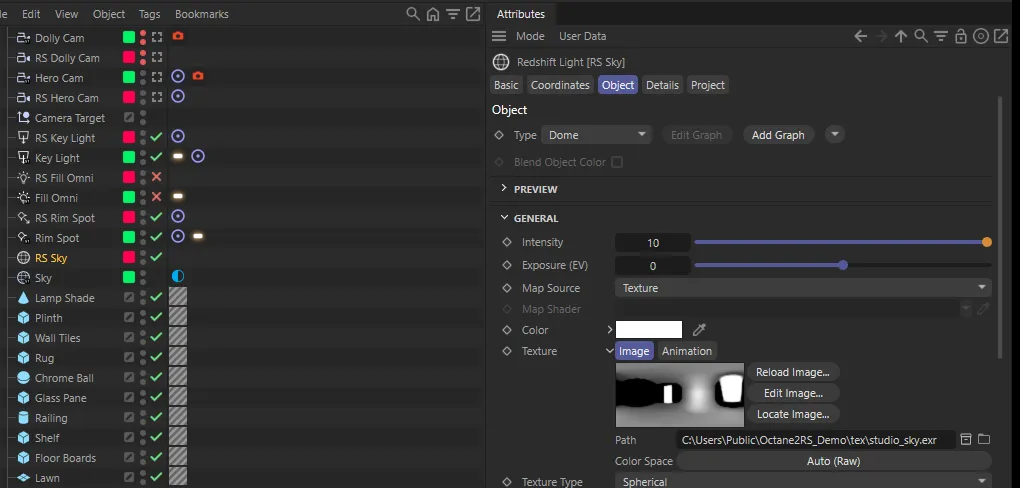
Section titled “HDRI environments”An object with an Octane Environment tag becomes a Redshift Dome light:
- Image — the HDRI file from the Octane Environment’s texture. If there isn’t one, the converter looks for a Greyscalegorilla HDRI Link tag on the same object and uses its image instead. With neither, the Dome has no image and the report says so.
- Power — copied to the Dome’s intensity × 10.
- Rotation — Octane’s horizontal and vertical sky rotation become the Dome’s heading and pitch. Bank is left alone. Rotation is set even when the Dome gets no image, so it’s right once you load one.
The HDRI Link tag, like any other non-Octane tag, is copied to the Dome too.
Daylight
Section titled “Daylight”An Octane Daylight tag becomes a Redshift Physical Sun, in the same place and with the same rotation as the object that carried it. The Octane Daylight settings themselves (sun direction mode, turbidity, power and so on) aren’t carried across — set up the Sun in Redshift.
Keeping or deleting the originals
Section titled “Keeping or deleting the originals”- Delete Octane Lights deletes each original light, Daylight object or Environment object once its Redshift light exists. Anything parented under that object is deleted with it — move children out first.
- Strip all Octane tags (with Delete Octane Lights off) keeps the original lights but removes their Octane light tag.
- With both off, the originals stay untouched, in the Lights ▸ Octane layer. Hide or delete them once you’re happy, so they don’t light the scene twice.
Converted lights go into Lights ▸ Redshift.