
Licensing & support
The Octane to Redshift Converter is sold through aescripts + aeplugins. It runs in Cinema 4D 2024 to 2027 with Redshift, on Windows and macOS (Apple Silicon).
Install
Section titled “Install”The easiest way to install and license the converter is the aescripts + aeplugins manager app. Restart Cinema 4D afterwards, then open the converter from Extensions ▸ Chroma ▸ Octane to RS Converter.
Updates come through the manager app too.
Activate, or start a trial
Section titled “Activate, or start a trial”The first time you open the converter, the aescripts licence window asks for your serial number. Paste it in to activate.
To try the converter first, type trial instead of a serial. The trial lasts 14 days.
Checking or moving your licence
Section titled “Checking or moving your licence”Click the icon at the top left of the panel, or choose Edit ▸ License… from the panel’s menu, to open the licence window. When the converter is licensed it shows Registered to … and a Deactivate License button.
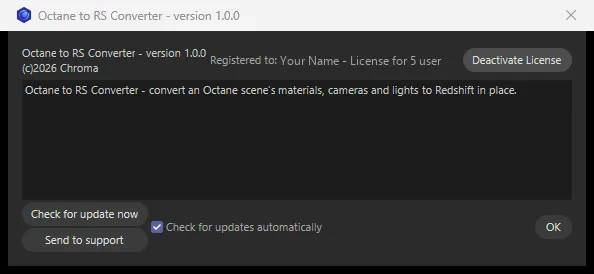
Moving to a new computer? Click Deactivate License on the old one first, then activate on the new one with the same serial.
Bought from Gumroad?
Section titled “Bought from Gumroad?”The converter is also sold on Gumroad. If that’s where you bought it, your build works a little differently:
- Activate by pasting your Gumroad licence key into the activation window that appears the first time you open the converter, then clicking Activate. There’s no trial.
- Check or move your licence with the icon at the top left of the panel (or Edit ▸ License…). It shows who the licence belongs to, with a Deactivate button — use it before moving to another computer.
- Updates are offered in the panel itself: when a new version is out, an Update Now button appears at the top right. Click it, save the zip it downloads, extract it over your plugin folder and restart Cinema 4D.
Support
Section titled “Support”Questions or problems? Open a support ticket from the Octane to Redshift Converter page on aescripts.com. After a conversion, click Save Report in the Conversion Complete window and attach the report to your ticket — it shows exactly what the converter did and what it skipped.
Octane to Redshift Converter © Chroma Studios Ltd · chroma.london