
Scatter
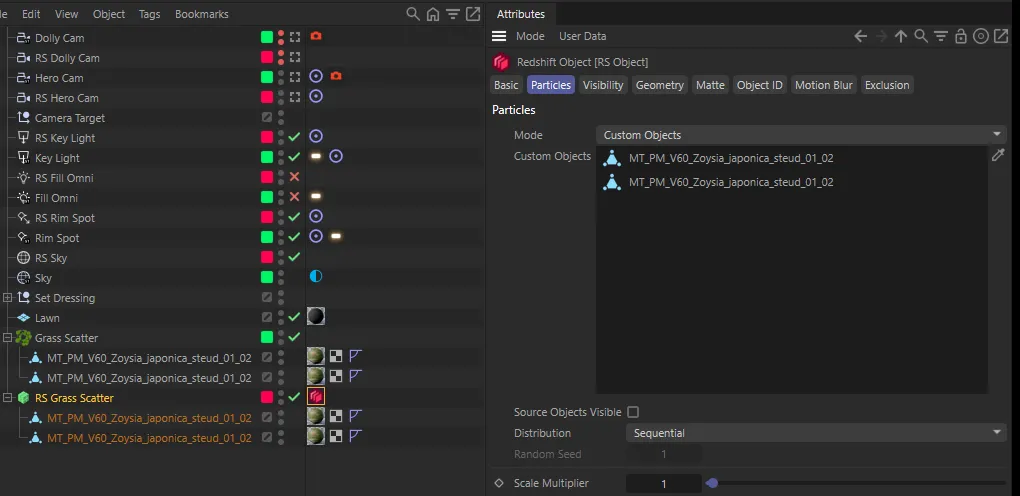
Octane’s Scatter object only exists inside Octane. With Scatter → Matrix ticked, the
converter rebuilds each one as a MoGraph Matrix that Redshift renders as instances, placed
directly below the Scatter in the Object Manager and named RS <scatter name>.
What the converter sets up
Section titled “What the converter sets up”- A Matrix in Object mode, at the Scatter’s position, with the Scatter’s Surface object as its distribution object.
- The Scatter’s Count.
- The Scatter’s up vector, when it points straight along an axis.
- The Scatter’s Effectors.
- Copies of the Scatter’s child objects, placed under the Matrix.
- A Redshift Object tag on the Matrix with its particle mode set to Custom Objects, listing those copies — this is what makes Redshift render an instance at each Matrix point.
If the Scatter has no Surface object, the report says so: set the Matrix’s Object by hand.
What you’ll set by hand
Section titled “What you’ll set by hand”Only the settings above are carried across. Everything else on the Octane Scatter — how points are distributed, the seed, scale and rotation ranges, which child is used where — needs setting on the Matrix (and with effectors, if you use them). An up vector that doesn’t point straight along an axis is left at the Matrix’s default.
Keeping or deleting the originals
Section titled “Keeping or deleting the originals”Delete Octane Scatter deletes each Scatter once its Matrix exists. The Scatter’s own children go with it — the Matrix has its own copies. With the option off, Scatters stay in the Scatter ▸ Octane layer and Matrix objects go into Scatter ▸ Redshift.